Setting up Discord Linked Roles
Linked Roles are a Discord feature: you set requirements, and members who meet them claim the role themselves. Discord checks the numbers against The Bayou Ledger and enforces the result. It's set up inside Discord and is free.
Linked Roles or automatic roles?
| Linked Roles | Automatic roles | |
|---|---|---|
| Set up in | Discord | Our site |
| Who assigns it | The member claims it | Our bot |
| Conditions | Minimums only ("at least") | >, < and = |
| Several conditions per role | Yes | Yes |
| Removed when stats drop | No | Yes |
| Cost | Free | Legend or Old Blood |
You can use both on the same server.
Before you start
- Your members must each link their Discord account. A member who hasn't linked can't qualify.
- You need the Manage Roles permission in the server.
Post this link in your server so members can connect:
https://bayouledger.com/discord/verify
It signs you in with Steam if needed, then confirms the link.
Create the role
Requirements can only be added to a role that has no members, so start with a fresh one.
- Open Server Settings → Roles.
- Press Create Role and give it a name, e.g.
6 stars. - Open the new role and switch to the Links tab.
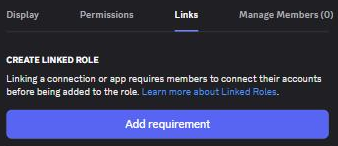
Add the requirement
- Press Add requirement.
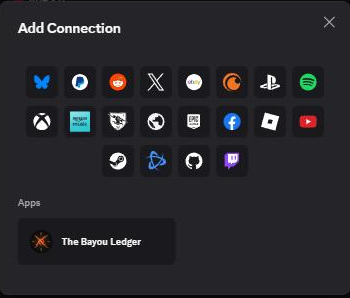
- In the Add Connection window, look under Apps and pick The Bayou Ledger.
- Turn on the stats you want to gate on and type a value for each.
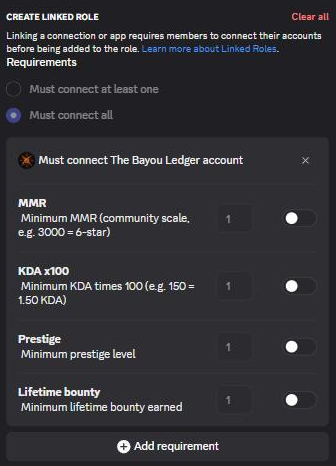
- If you added more than one, choose Must connect all (every requirement has to pass) or Must connect at least one.
- Press Save Changes.
Members can now claim the role from the server's Channels & Roles section.
The four stats
Every requirement is a minimum: Discord treats it as "at least this much".
- MMR - the in-game MMR number.
- KDA x100 - the KDA ratio multiplied by 100. A
1.50KDA is150here. - Prestige - the prestige level.
- Lifetime bounty - total bounty earned.
MMR and stars
Hunt shows stars instead of MMR. Use the lowest MMR in each band for a role like "5 stars and up":
| Stars | MMR from |
|---|---|
| 2 | 1592 |
| 3 | 2066 |
| 4 | 2504 |
| 5 | 2713 |
| 6 | 2959 |
A 6-star role needs an MMR requirement of 2959.
Revoking, hidden profiles and renaming
- Discord decides, we only supply the numbers. If a member stops meeting it, Discord stops offering the role but doesn't revoke one already claimed. For roles removed automatically, use automatic roles.
- Hidden profiles can't qualify. A hunter who hides their profile in Hunt has no stats to check.
- Renaming the role is fine. The requirement stays attached to the role.
Need a hand?
If something here doesn't match what you see, ask on our Discord server - other hunters are there too.