Linking your Discord account
Linking ties your Hunt: Showdown 1896 stats to your Discord account. Once linked, servers you are in can grant you roles automatically from those stats - a 6-star role, a veteran role, whatever the server sets up.
Linking is free and takes about a minute, once.
What gets shared
Four numbers, and nothing else:
- MMR - your in-game MMR
- KDA - your kill/death/assist ratio
- Prestige - your prestige level
- Lifetime bounty - the total bounty you have earned
Servers never see your Steam account, your match history, or anything you haven't already made public on your dossier.
Link your account
- Sign in with Steam to prove the account is yours.
- Open the connect page, or your account page under Discord integration.
- Press Connect with Discord.
- Discord asks you to confirm. Press Authorize.
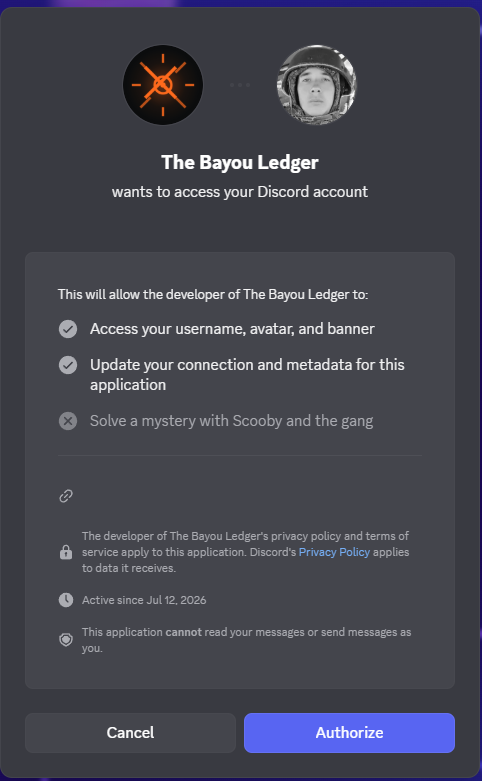
The app reads your username and avatar, and updates your connection metadata - that is what lets us pass your Hunt stats to Discord. It cannot read your messages or send messages as you.
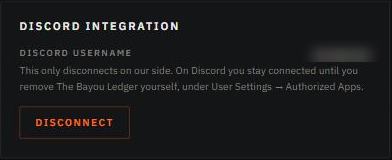
Your account page now shows your Discord username.
What to do next
Linking alone doesn't give you any roles - a server still has to offer them:
- Discord Linked Roles - the server sets requirements and you claim the role yourself.
- Automatic Discord roles - the server's bot grants and removes roles as your stats change.
If a role doesn't appear
- Give it a moment. Stats refresh on their own, and a new role can take a few minutes to show up. You can also force a re-check from Discord.
- Check your profile isn't hidden. If you turned on "hide my profile" in Hunt, your stats are withheld and no role can work.
- Reconnect if the link was revoked. If you removed the app on Discord's side, your account page shows a Reconnect Discord button.
Unlinking
Disconnect on your account page removes the link on our side, and any roles that depended on it stop applying.
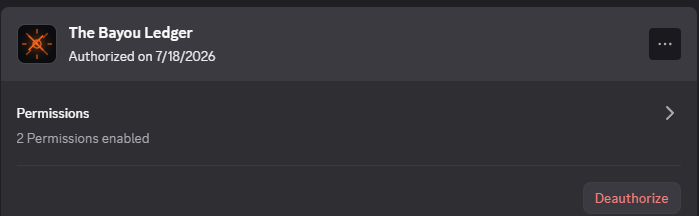
On Discord you stay connected until you remove the app yourself, under User Settings → Authorized Apps → Deauthorize.
Need a hand?
If something here doesn't match what you see, ask on our Discord server - other hunters are there too.