Goals
Everything else on the site tells you where you've been. A goal is the one thing that tracks where you're trying to get to: pick a stat, pick a number, and the site follows it on your dossier - and on your overlay if you want your chat watching too.
You can hold one goal at a time. Setting a new one puts the old one away.
Setting one
Goals live on your own dossier - you set one where you watch it. Open your dossier and press Set a goal, under the party-finder button. Then:
- Pick the metric: MMR, Clash MMR, KDA, KD, kills, wipes or bounty.
- Pick the kind - this is the important choice, see below. KDA and KD have only one kind, so for those the choice doesn't appear.
- Type a target.
- Pick a start date. It can be in the past.
- Optionally add a deadline.
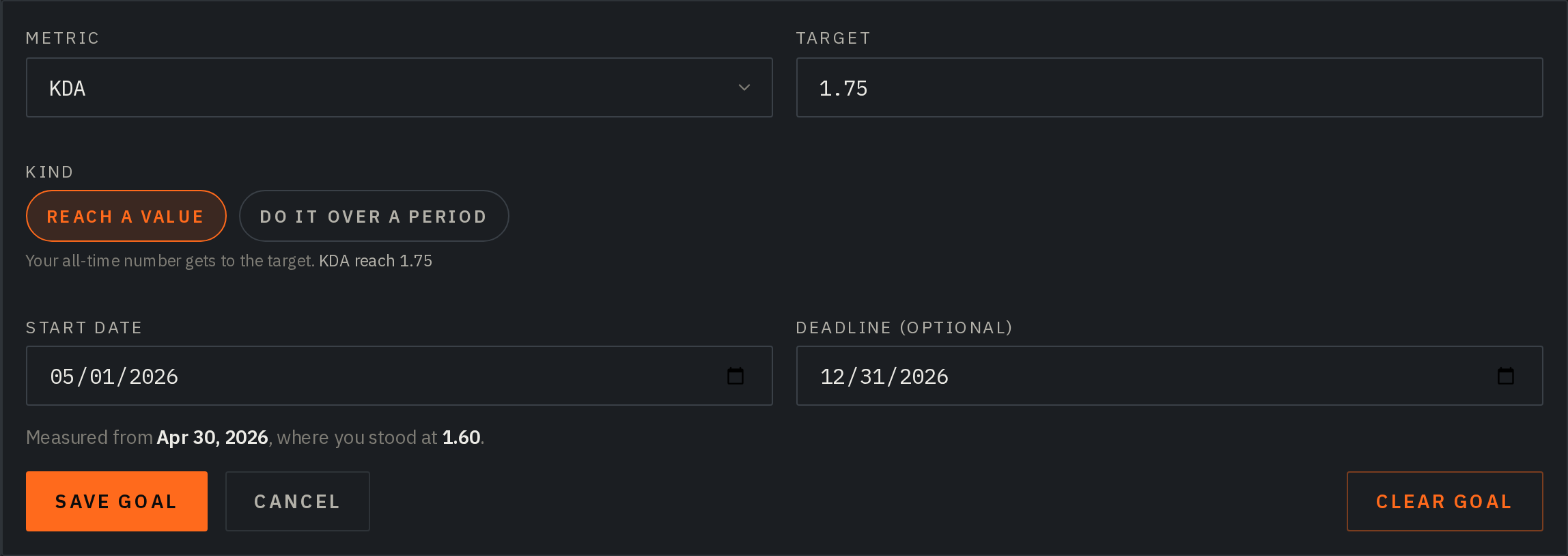
Once a goal is running, the same block carries an Edit control to change or clear it. Nobody else sees those controls - to a visitor the block is just your progress.
Goals come with every supporter tier, including the Overlay plan and the free 5-day overlay demo.
The two kinds of goal
Reach a value targets your all-time number. "Reach 3 000 MMR", "reach 10 000 lifetime kills". Straightforward, and the right shape for MMR - your rating is a level, not a total, so there's nothing to accumulate.
Do it over a period counts only from the start date onward. "1 000 kills since the 1st" - your history so far doesn't weigh it down. Use it for anything you want to do this month.
KDA and KD are always all-time. They don't offer the period kind, and that's deliberate. A ratio over a short window isn't really a number: six kills against six deaths is a "1.00 K/D", and a goal that reads done off one evening's play is worse than no goal, because finishing is permanent - it doesn't come undone when the next hour goes badly. Measured across your whole record, a ratio target costs what it looks like it costs.
What a ratio target really costs
Because KDA and KD are all-time, a small-looking step is a lot of play. Going from 1.55 to 2.00 with 8 000 deaths behind you is thousands of kills.
So when you type a ratio target, the editor tells you what it's worth in kills from where you stand right now, before you save. Take that as the floor, not the price: it assumes you never die again, and every death along the way pushes it up. Aim close and move the goal up as you get there.
Backdating
You can start a goal in the past, and the site measures from where you actually were on that date. If you pick a date from before we started tracking you, we use the earliest day we hold and say so on the goal - it never quietly pretends the goal began when you asked.
The editor shows you what your chosen start resolves to before you save, so you're not guessing.
What you get

While a goal is running, your dossier shows:
- a progress bar and how far there is left to go. Hover the bar for where the run started and what it has averaged the whole way. If you have a deadline and you have fallen under it, the bar also carries the schedule behind your own fill - hover that for what an even run would have you at today, and how many days of the plan you are down
- on a KDA or K/D goal, hover the to go figure as well. A ratio gap says nothing on its own - the same 0.14 is twenty kills for one hunter and four hundred for another, depending on how many deaths it's divided by - so we put it in kills: how many more, taking no more deaths, would get you there
- your pace - how much you're gaining per day, measured over the last two weeks, so a long-backdated goal still reports what you're doing now. Hover it to see the last five sessions on their own, each one's gain or loss
- when you'll get there at that pace, or - if you set a deadline - the pace you'd need, and whether you're ahead or behind it. With a deadline months out the needed pace is also given per month, where "0.0005 a day" becomes a number you can picture
- the deadline itself, with how many days are left on it
If you haven't played for a few days the goal reads as stalled, and no completion date is shown: guessing a date off no progress would just be a made-up number.
When you finish
The goal is marked done and freezes. It stops tracking your live stats - it's over - and instead reports what the run took:
- how long it took
- your average per day across the whole run
- the number you actually finished at, which is often past the target
- how far ahead of or behind your deadline you landed, if you set one
Finishing is permanent. If you hit 3 000 MMR and slip back to 2 985 the next match, the goal still says done. If a deadline passes before you get there the goal reads overdue - but you can still finish it, and it'll record that you finished late.
A finished goal stays on your dossier until you clear it or set a new one.
On your overlay
Switch on Show goal in the overlay editor - that is the only control, and it stays greyed out until you have a goal to show. Your card gets a compact row: the metric, a progress bar, where you are against the target, and what the current session has put into it - the one number only the overlay can tell you.
It updates live as you play. Set or change a goal mid-stream and it appears on your overlay straight away, no need to touch OBS. And when you finish it on stream, the card switches to its done state right then.
Things worth knowing
- A goal is public on your dossier - anyone looking at your page sees it. It gives away nothing your page doesn't already show. If your account is private or you've opted out of public stats, nobody sees it, same as the rest.
- You can't set a goal you've already met - there'd be nothing to track.
- Finishing is permanent. Once a goal reads done it stays done, even if the number slips back afterwards - it's a record of what you did, not a live scoreboard.
- If your subscription lapses your goal isn't deleted - it just stops showing. Resubscribe and it comes back exactly as it was.